100% free·Open source·Notarized by Apple

A calm companion
for your Mac.

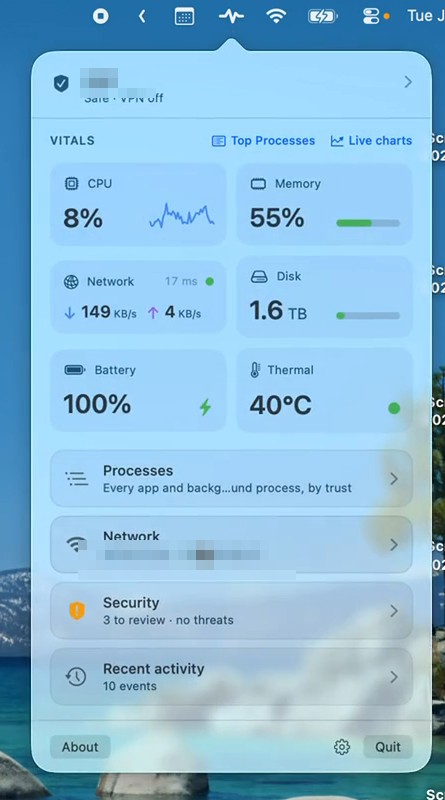
Pulse lives in your menu bar and keeps watch over the things you'd rather not think about: speed, heat, battery, disk, Wi‑Fi safety, and the security settings that should be on. When everything's fine, you see one quiet dot. When something needs you, it says so in plain English.

↓ Download free $brew install --cask nativemojo/tap/mojo-pulse

9.5 MB · macOS 15+ · Apple Silicon & Intel · no account, no ads, no tracking

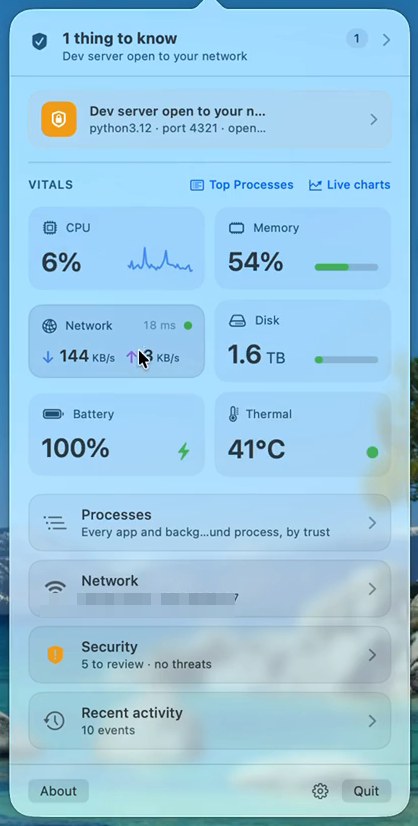
Real screenshot of the Mojo Pulse popover open under the macOS menu bar

Real screenshot, v1.16.3 — network names and IPs blurred.

Incidents shout,
vitals whisper.

Activity Monitor shows you everything and leaves the judgment to you. Pulse leads with the judgment. Most of the time it's a single gray dot in your menu bar. It changes color only when there's something you'd actually want to know, then tells you what it is, why it matters, and what to do about it.

Quieteverything's fine
Greenwatched, on a VPN
Yellowworth a look
Redneeds you now
Security posture

Know your Mac has its locks on.

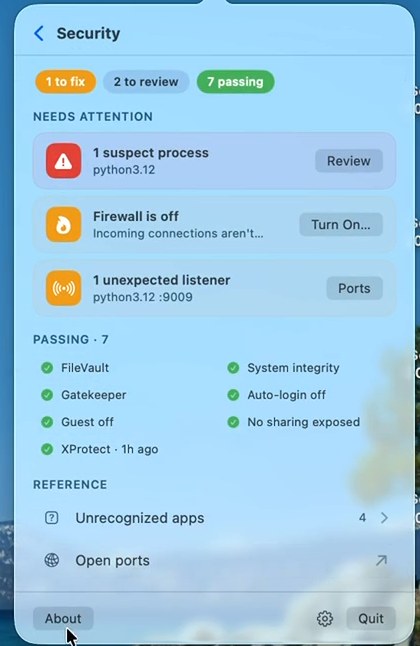
Pulse continuously checks the protections macOS already ships: FileVault encryption, Gatekeeper, the firewall, System Integrity Protection, XProtect scans. It also watches the things nobody looks at, like new login items, file sharing exposed to the network, and running programs that don't add up. Green means checked, not assumed. And when something's off, the button in the card takes you straight to the fix.

Under the hoodRead-only checks of macOS's own state. No kernel extensions, no root helper, no admin password. Suspect-process detection uses code-signing identity, notarization status, and first-seen baselines.
Security screen triaging one thing to fix, two to review, seven passing
Network diagnosis

When the internet crawls, find out who to blame.

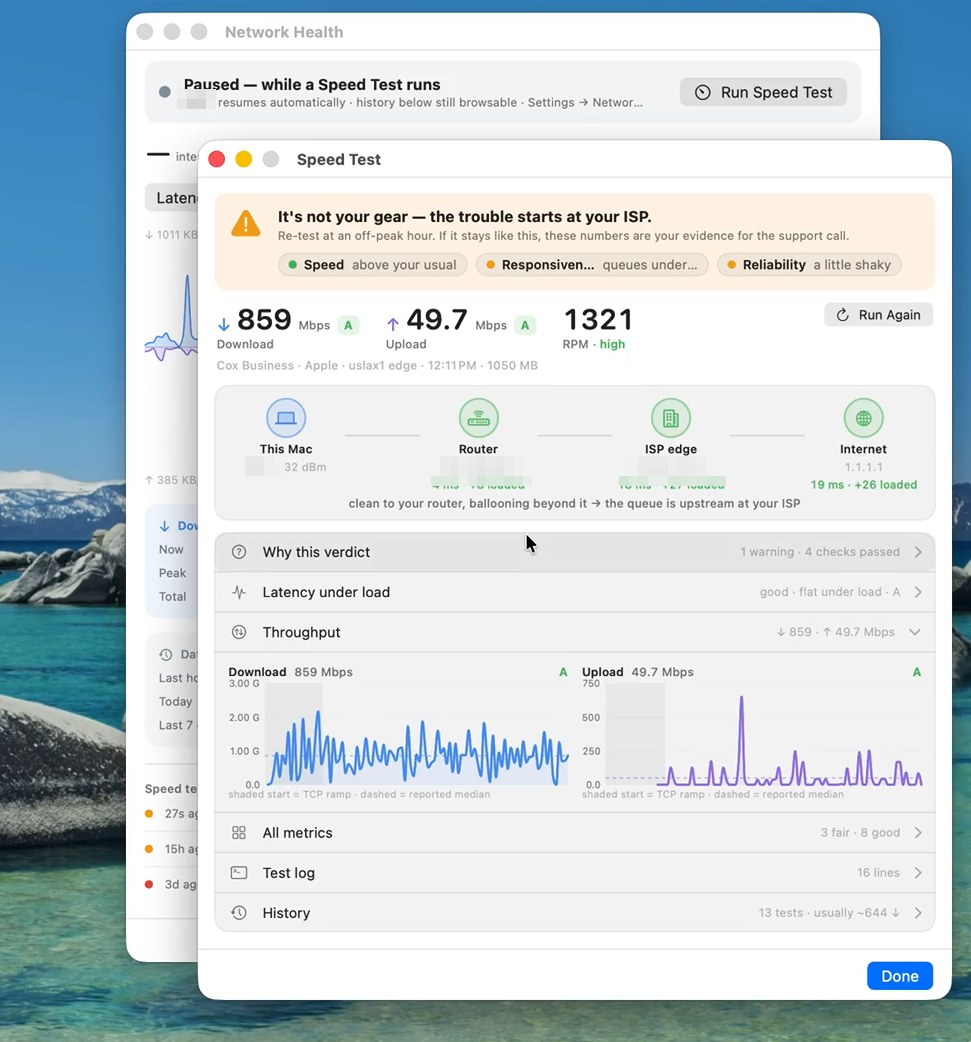
Run a speed test that watches every leg of the path separately: your Mac, your router, your ISP, the wider internet. Instead of one big number, you get a verdict, like "it's not your gear — the trouble starts at your ISP", and the evidence to back it up on the support call. Between tests, a passive sentinel notices degradation you'd otherwise blame on your Mac.

Under the hoodLatency under load per hop, bufferbloat grades, packet loss, DNS timing, RPM. Passive monitoring costs ~1–2 MB a day and pauses itself on battery.
Speed test verdict naming the ISP as the culprit, with per-hop latency
Connections

See who your Mac talks to.

Every app makes connections you never see. Pulse shows them live, names the process behind each one, and can place them on a map of the world. If something on your Mac starts talking to a flagged address, you'll hear about it.

Under the hoodSocket-level process attribution, on device. The map's geo lookup is opt-in and sends only public IP addresses; your LAN never leaves the Mac.
World map of live outbound connections with process attribution
Alerts

Alerts that explain themselves.

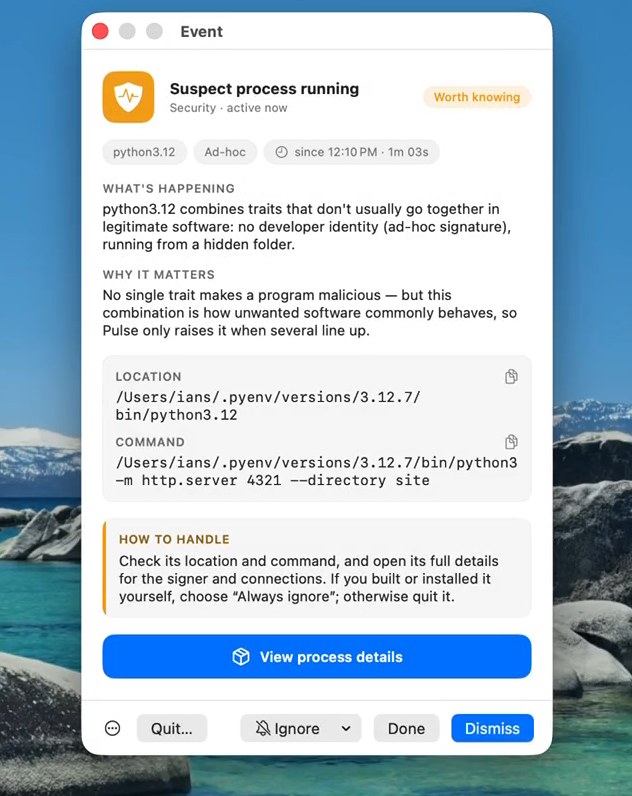
No cryptic codes, no wall of numbers. Every alert says what's happening, why it matters, and how to handle it, with the evidence attached. Dismiss it, snooze it for an hour, or silence that exact finding forever. Pulse learns what's normal on your Mac and stays quiet about it.

Dev server open to your network Suspect process running This network runs rough Memory pressure is high
A suspect-process alert explaining what happened, why it matters, and how to handle it

And that's not all of it.

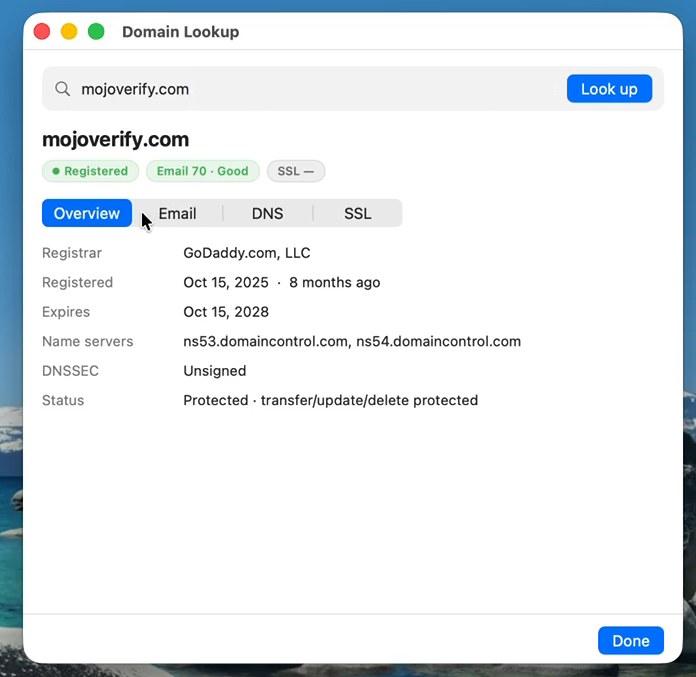
Every image on this page is a real, unretouched screenshot from the current release. Only network names and IP addresses are blurred.

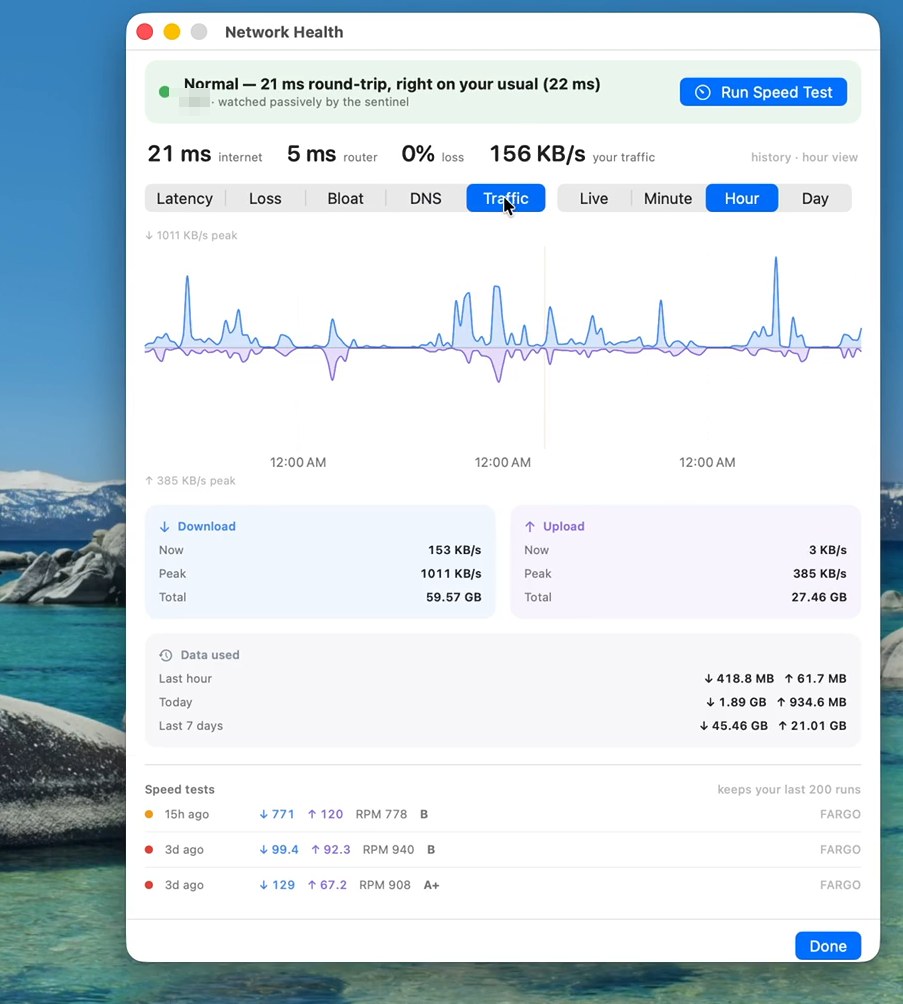
Network Health window with latency history and speed test log
Network HealthYour connection's history: latency, loss, bufferbloat, traffic.
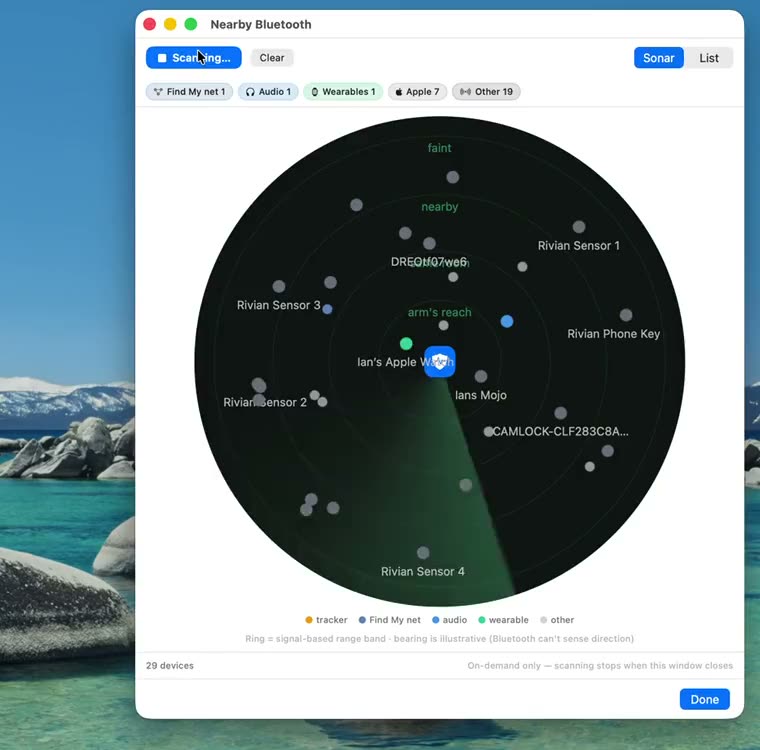
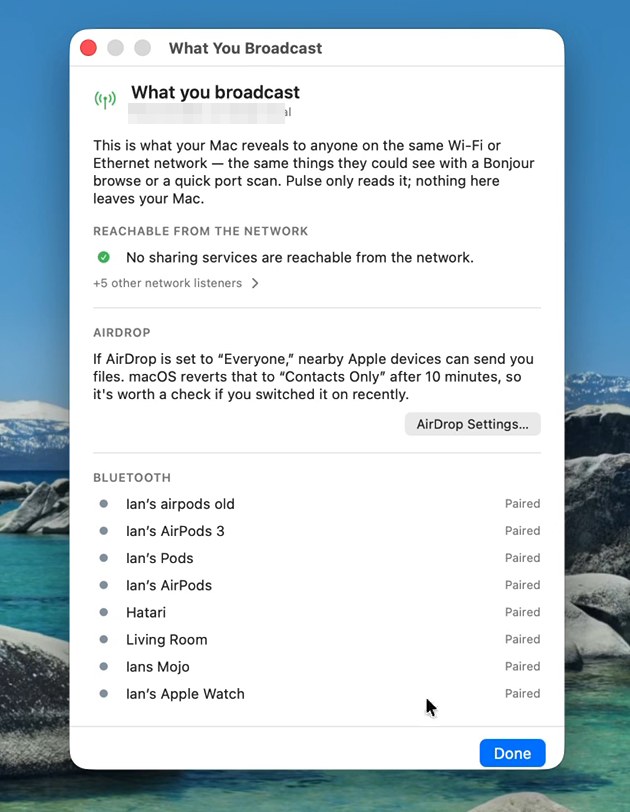
Bluetooth sonar showing nearby devices and a separated tracker
Bluetooth sonarWhat's broadcasting around you, including hidden trackers.
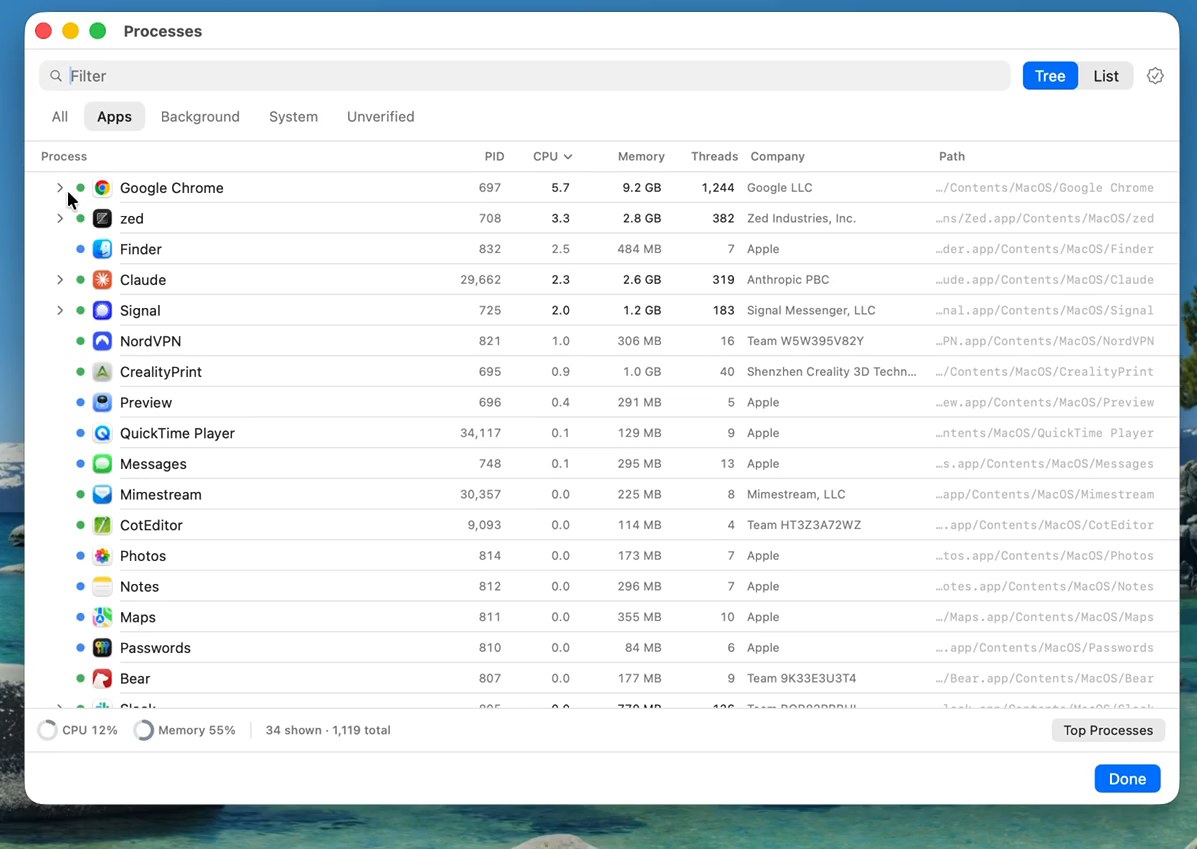
Process explorer grouping helpers under their apps with verified companies
Every process, by trustSigned, unverified, or suspect. Sortable, searchable, groupable.
Interactive treemap of disk usage
Disk treemapWhere your storage actually went.
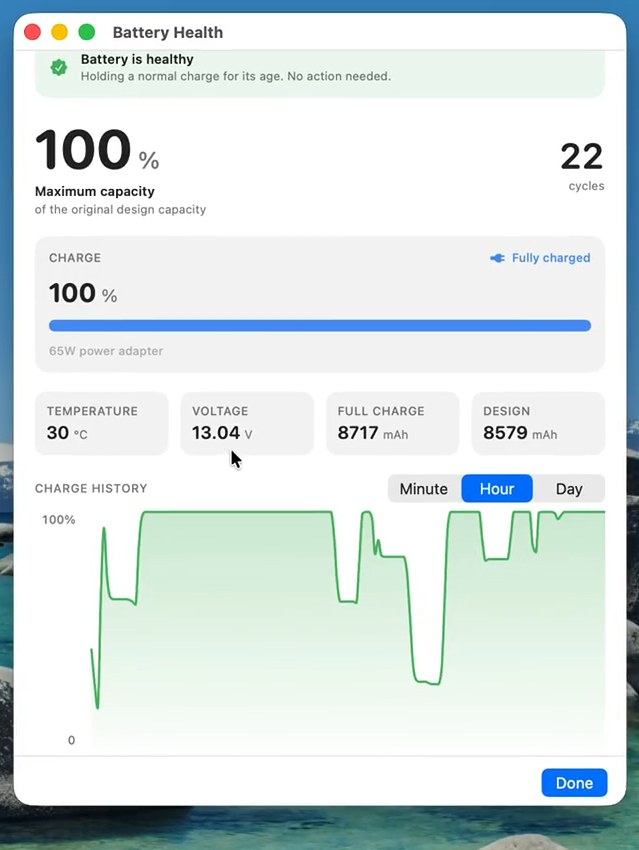
Battery health with capacity, cycles, and charge history
Battery, honestlyCapacity, cycles, and a plain-English verdict.
The part people don't believe

Free. Actually free. And signed.

A free security tool earns skepticism. Here are the receipts.

No catch

No price, no trial that expires, no Pro tier, no ads, no account. Download it, use it, share it. The complete source code is public on GitHub under the Apache 2.0 license, so you don't have to take our word for anything on this page.

Nothing leaves your Mac

No analytics, no telemetry, no account system. Aside from checking GitHub for updates, Pulse makes no network calls of its own unless you switch on the optional map lookups, and those send only public IP addresses.

Signed and notarized by Apple

Every release is signed with an Apple Developer ID and submitted to Apple's notary service before it ships, which means Apple's own malware checks have scanned it and macOS verifies its integrity when you install. That's why there's no scary "unidentified developer" warning. Don't take our word for it — after installing, ask macOS yourself:

$ spctl -a -vv /Applications/MojoPulse.app
/Applications/MojoPulse.app: accepted
source=Notarized Developer ID

Fair questions.

The things people actually ask before installing.

Is it really free?
Yes. Free as in $0, and free as in open source (Apache 2.0). There's no trial period, no locked features, and no ads. If it earns a spot in your menu bar, tell a friend.
Is it safe to install?
Every release is signed with an Apple Developer ID and notarized by Apple, so macOS itself verifies the app hasn't been tampered with, and Gatekeeper opens it without warnings. The source code is public if you want to read exactly what it does, and the verify command above lets you check the seal yourself.
Will it slow my Mac down?
It's a native Swift app, not a web wrapper. In the background it samples every 5 seconds and steps up to 2 only while you're actually looking; heavier checks are cost-gated so they never pile up. The whole download is under 10 MB.
What data does it send off my Mac?
By default: nothing except checking GitHub for app updates. If you opt in to the connection map's location lookups, it sends public IP addresses (never local ones) to resolve their location, and that's the complete list. There is no analytics or telemetry of any kind.
What permissions does it ask for?
None to start — no admin password, ever. Some features ask in context when you first use them: Location (macOS requires it just to read Wi‑Fi network names), Local Network (to name devices on your LAN), Bluetooth (for the sonar). Each is optional, and the features simply stay off until you want them.
How is this different from Activity Monitor or iStat Menus?
Those are dashboards: they show numbers and leave the judgment to you. Pulse leads with the judgment — is anything wrong, how bad is it, what should you do — and keeps the numbers one click away. It also covers ground they don't: security posture, Wi‑Fi safety checks, path-aware speed tests, and Bluetooth tracker detection.
How do updates work?
In-app, using the standard Sparkle framework macOS apps have trusted for years. Each update is cryptographically signed, and you approve installs. Prefer Homebrew? brew upgrade works too.
How do I uninstall it?
Quit it and drag it from Applications to the Trash. Pulse installs no background helpers, daemons, or kernel extensions, so nothing keeps running after it's gone.
Bring the calm to your menu bar.

Free, 9.5 MB, notarized by Apple. Three steps and you're done.

Apple Silicon & Intel · macOS 15 Sequoia+ · v1.16.3
1
Download & openClick the button — you'll get MojoPulse.dmg. Double-click to open it.
2
Drag to ApplicationsDrag Mojo Pulse onto the Applications folder in the window that appears.
3
Launch itOpen it from Applications. It lives in your menu bar — look for the dot.
Prefer the terminal? $brew install --cask nativemojo/tap/mojo-pulse
v1.16.3 Latest release The 1.16 series added Network Sentinel — a passive watch on your connection's quality — plus the Network Health window and a live latency readout on the menu-bar tile. All releases →